🚚 Free Worldwide Shipping on All Orders!Shop Now
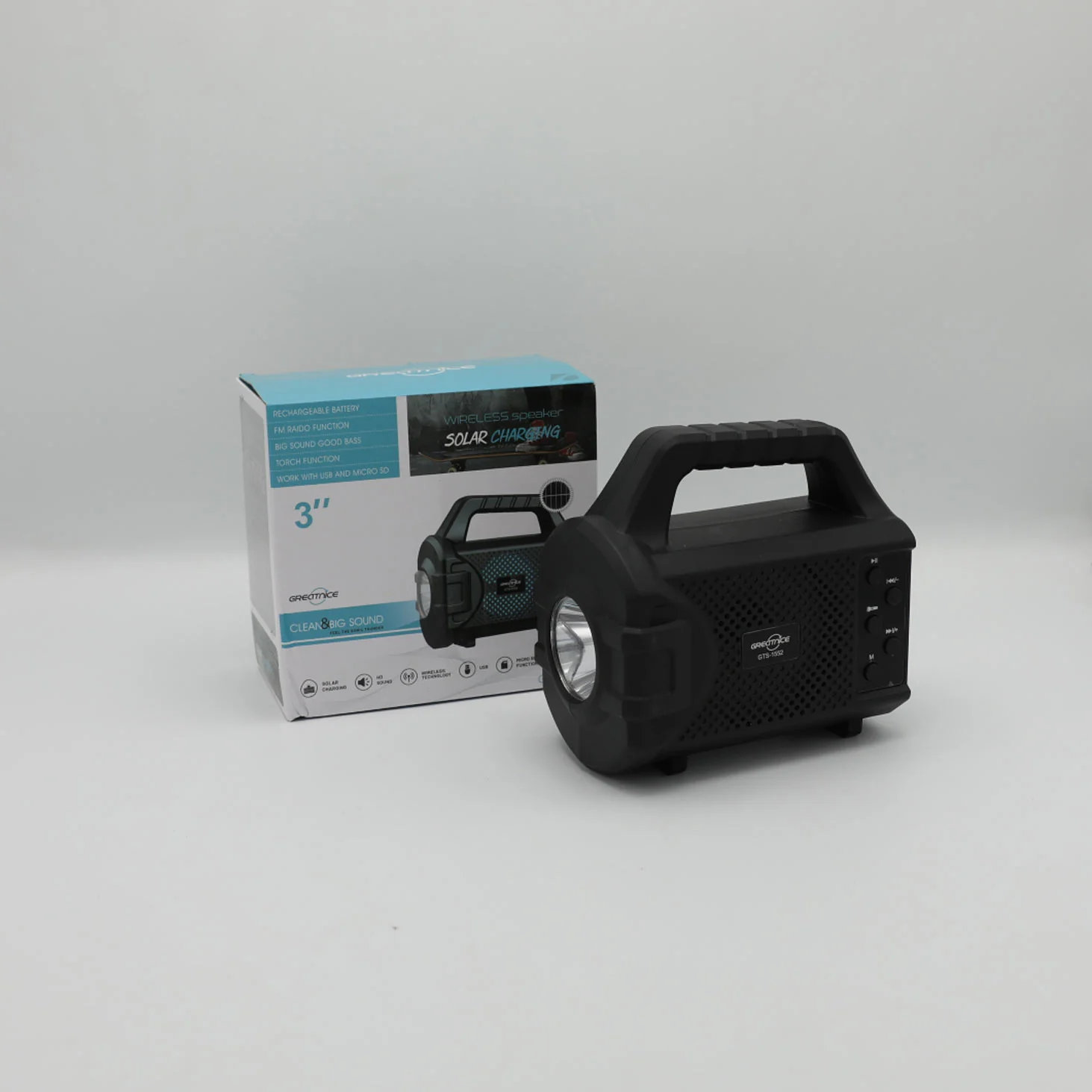
Greatnice Wireless Speaker 3 Inch Solar Charging No GTS-1552 Rs 2200
1.OFF/ON: To turn ON/OFF the speaker.
2.DC SV. Plug the Micro USB cable to the speaker and connect
other end USB port to the power source, (DC 5V) 3.USB slot: Used to read the song files in FAT32 format with maximum size of 32GB
4TF slot Used to read the song files in FAT32 format with maximum size of 32GB
5 Play/Pause: Under USB/TF/Wireless mode, short press for play
and pause
6.M: To change mode during USB/TF, Wireless, FM mode. 7 PREV/VOLS USB/TF/Wireless/FM mode: Swipe left to move
previous FM channel / track
Swipe left and long press to decrease the volume. 8.NEXT/VOL+: USB/TF/Smart/FM mode: Swipe right to move next FM channel/track
Swipe right and long press to increase the volume. 9. Press to switch the torch or change the mode
2.DC SV. Plug the Micro USB cable to the speaker and connect
other end USB port to the power source, (DC 5V) 3.USB slot: Used to read the song files in FAT32 format with maximum size of 32GB
4TF slot Used to read the song files in FAT32 format with maximum size of 32GB
5 Play/Pause: Under USB/TF/Wireless mode, short press for play
and pause
6.M: To change mode during USB/TF, Wireless, FM mode. 7 PREV/VOLS USB/TF/Wireless/FM mode: Swipe left to move
previous FM channel / track
Swipe left and long press to decrease the volume. 8.NEXT/VOL+: USB/TF/Smart/FM mode: Swipe right to move next FM channel/track
Swipe right and long press to increase the volume. 9. Press to switch the torch or change the mode
$2.36
Original: $7.87
-70%Greatnice Wireless Speaker 3 Inch Solar Charging No GTS-1552 Rs 2200—
$7.87
$2.36Product Information
Product Information
Shipping & Returns
Shipping & Returns
Description
1.OFF/ON: To turn ON/OFF the speaker.
2.DC SV. Plug the Micro USB cable to the speaker and connect
other end USB port to the power source, (DC 5V) 3.USB slot: Used to read the song files in FAT32 format with maximum size of 32GB
4TF slot Used to read the song files in FAT32 format with maximum size of 32GB
5 Play/Pause: Under USB/TF/Wireless mode, short press for play
and pause
6.M: To change mode during USB/TF, Wireless, FM mode. 7 PREV/VOLS USB/TF/Wireless/FM mode: Swipe left to move
previous FM channel / track
Swipe left and long press to decrease the volume. 8.NEXT/VOL+: USB/TF/Smart/FM mode: Swipe right to move next FM channel/track
Swipe right and long press to increase the volume. 9. Press to switch the torch or change the mode
2.DC SV. Plug the Micro USB cable to the speaker and connect
other end USB port to the power source, (DC 5V) 3.USB slot: Used to read the song files in FAT32 format with maximum size of 32GB
4TF slot Used to read the song files in FAT32 format with maximum size of 32GB
5 Play/Pause: Under USB/TF/Wireless mode, short press for play
and pause
6.M: To change mode during USB/TF, Wireless, FM mode. 7 PREV/VOLS USB/TF/Wireless/FM mode: Swipe left to move
previous FM channel / track
Swipe left and long press to decrease the volume. 8.NEXT/VOL+: USB/TF/Smart/FM mode: Swipe right to move next FM channel/track
Swipe right and long press to increase the volume. 9. Press to switch the torch or change the mode